Google I/O 2025
Google held their annual Google I/O event starting on May 20th, where they unveiled their newest platform announcements for the year. Artificial Intelligence advancements were front and center throughout the whole event, touching every area of the Google development ecosystem.
Here are five key focus areas that technologists and digital strategists should be planning for in their development roadmaps over the coming year.
Android 16 Features
The latest version of Android is right around the corner, tentatively scheduled to release in the second half of 2025. Android developers should update their apps to target Android 16 and thoroughly test them to ensure they’re compliant with the new SDKs.
Android 16: Confirmed and leaked features for 2025's update

Live Updates
Similar to iOS’s Live Activities, Android 16’s Live Updates are a new class of notifications for tracking the progress of ongoing events. These notifications allow for frequently-updated information to be displayed on the Lock Screen and status bar, and are ideal for use cases like rideshare pickups, food delivery alerts, and navigation.
Material 3 Expressive
Google has updated its Material design system to Material 3 Expressive, designed to help apps feel more natural and engaging. It introduces new emotional design patterns aimed at boosting user engagement and usability, and a combination of interactive physics-based animations and haptics make the Android experience feel more responsive and lively. Material 3 Expressive also gives users the ability to personalize their experience with their own color settings and other preferences.
Edge-to-edge Layouts Now Required
Prior to Android 16, developers had the option of opting out of implementing edge-to-edge layouts. But starting with Android 16, support for edge-to-edge layouts is now required. Developers should ensure their apps correctly implement edge-to-edge layouts in their designs and implementations going forward.
Model Context Protocol (MCP) an overview
Changes to Back Navigation
Android’s back-navigation APIs have gradually changed over the past few versions, including the addition of predictive back gestures that give users glimpses into where they’re navigating when interactively swiping backwards in the navigation stack. Starting with Android 16, predictive back gesture animations will now be enabled by default.
Other Android 16 behavioral changes include updates to the elegant font APIs, health and fitness app permissions, safer intents initiative, and a variety of others.
For a more comprehensive roundup of the complete set, see here, and be sure to update your apps accordingly for your own relevant features.
Adaptive Apps in the Android Ecosystem
Adaptive apps are a design paradigm shift in the Android ecosystem. They emphasize allowing users to smoothly run apps across a variety of devices in any orientation, window size, and aspect ratio.
5 Game-Changing Android 16 Features I Can't Wait to Tinker With ...

Users on larger-screen devices like tablets will expect to be able to take complete advantage of their screen real estate, and adaptive apps enable this. Adaptive apps also run on devices like foldables, desktops, cars, TVs, and mixed reality wearables.
If you're already targeting larger-screen devices and haven't implemented the adaptive app model, schedule this into your development roadmap soon. Apps will need to start adhering to the new paradigm once they target Android 16, with the option to opt out if needed available in 2025. Starting in 2026, no opt-outs will be allowed.
And if you're not currently targeting larger-screen devices, now is a great time to start! It's easier than ever to build interfaces that smoothly scale to fit a wide variety of devices and window sizes.
This will also put you into a great position to easily expand onto other devices including foldables, cars, TVs, and mixed reality platforms.
Smaller-screen devices and games are currently exempt from these requirements. However, it's not a stretch to expect they may also need to comply at a future date.
Google is also working to make it as easy as possible to implement adaptive interfaces with SDK updates to the Compose adaptive layouts library, window size classes, Jetpack Navigation 3 (currently in alpha), and enhancements to the development tools for previewing and testing adaptive layouts.
Android XR for Immersive Experiences
Android is also expanding into the third dimension with Android XR, Google’s platform for building immersive experiences for glasses and headsets.
Android Developers Blog: The future is adaptive: Changes to ...

The platform beautifully leverages Google’s AI-powered Gemini assistant to deliver an intuitive, hands-free experience on Android XR wearable devices. Android XR promises to deliver powerful and natural experiences like navigation, live language translation, photos, and a multitude of other app experiences perfectly suited towards the wearable device landscape.
Android XR devices will be available later this year, but developers can start preparing apps for them right now. The platform supports native Android-based development with the Android Jetpack XR SDK, allowing developers to build apps with the same development languages, toolkits such as Jetpack Compose, and Material Design paradigm that Android developers already know and love.
Model Context Protocol (MCP) and AI Updates
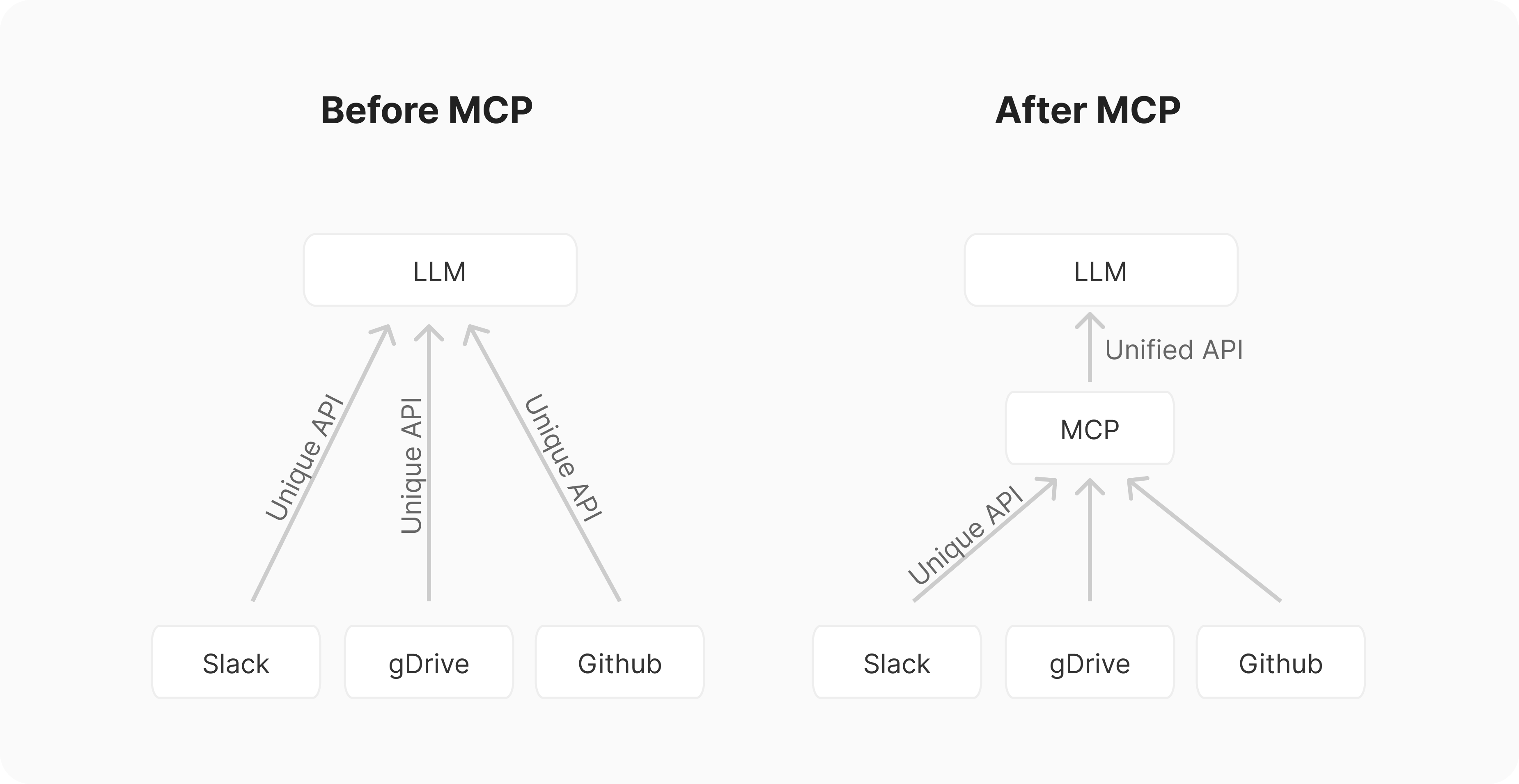
Model Context Protocol (MCP) is an open protocol introduced in November 2024. MCP is designed to standardize how AI models integrate and interact with external tools, data sources, and services.
Android 16: Confirmed and leaked features for 2025's update
Google announced that their Gemini SDKs now support MCP. Additionally, developers can now build AI agents leveraging Gemini 2.5's advanced reasoning capabilities with new tools like URL Context.
Google also introduced new ML Kit GenAI APIs that allow developers to build applications that utilize on-device AI tasks. GenAI APIs are powered by Gemini Nano and can perform common tasks such as summarizing and rewriting text and generating image descriptions.
Developer Tools Enhancements
Google introduced numerous developer tools and announced major updates to existing tools this year, focused on improving developer productivity, accelerating app creation, and enhancing application capabilities. A common thread across most of these innovations is the strategic integration of AI.
Android Studio
Android Studio becomes even more powerful with enhanced Gemini AI productivity tools designed to boost developer productivity at every stage of the development lifecycle.
Stitch
Stitch is an experimental AI tool that generates app designs from prompts and images. Stitch is powered by Gemini 2.5 Pro's multimodal capabilities.
Jules
Jules is a new asynchronous coding agent capable of handling complex tasks in large codebases, and is now in public beta.
Firebase Studio
Firebase Studio allows users to create an entire app using just a single AI prompt, and can even generate code by simply importing a Figma design.
Google AI Studio
Google AI Studio empowers developers to rapidly build applications using the Gemini API. It leverages the Gemini 2.5 Pro model and allows users to generate web applications simply by providing an AI prompt.


