Leveraging Partner Apps to Deliver on the Promise of AI-Led Productivity
The advent of generative AI is driving a rethink of what outcomes we deserve from our productivity software – from gains in efficiency to more deeply engaging employees and unleashing creativity and innovation. Expectations are higher and growing fast, even as the understanding of the key scenarios and use cases for this technology evolves just as quickly.
We anticipate businesses of all sizes to leverage a variety of tools and customizations to meet their specific needs and deliver on the potential of AI-enhanced productivity, and there is an ecosystem of options rising to meet this challenge. On Monday September 16th, we shared updates we are making to the capabilities offered by Microsoft 365 Copilot, introduced Copilot agents and announced a new simplified agent builder experience powered by Copilot Studio. This article offers an overview of how Microsoft 365 customers can also leverage partner tools and apps as part of their broader approach to productivity, and Microsoft’s commitment to providing interoperability for those solutions across key Microsoft 365 surfaces.
Supporting the Ecosystem of Gen-AI Productivity Apps
The market for generative AI productivity solutions has grown exponentially in the past few years, both in number and the sophistication of available products. Microsoft is committed to offering developers and customers flexibility and choice as they try and deploy generative AI tools in tandem with Microsoft 365 applications, backed by a robust marketplace for customers to discover and adopt a diverse set of third-party solutions to meet their needs. Developers can create tailored and integrated experiences across Office, Outlook and Teams using extensive interoperability options within Microsoft 365 and Office 365 apps and services. The Microsoft Teams Store and Microsoft AppSource help create a vibrant ecosystem where customers get a wide range of solutions and partners get a platform where they can innovate and grow their business. Microsoft Teams alone supports more than 1,400 third-party apps, and monthly usage of third-party apps within Teams has increased more than 10 times over the past 2 years.
Partner Highlight, AI in Office (Word) – Harvey.ai
Harvey, the leading professional services platform engineered with AI, has developed an integration with Microsoft Word specialized for the law, tax, and finance fields. The new Harvey integration helps users draft, analyze, and research with natural language instructions and AI-powered experiences directly in Word.
 Cisco Unveils Next-Gen Solutions that Empower Security and ...
Partner Highlight, AI in Office (Excel) - Datasnipper
DataSnipper, a generative-AI software startup that automates critical tasks for accountants and auditors, has developed a deep integration with Microsoft Excel. DataSnipper’s integrated product experience streamlines manual steps such as data entry and validation for audit and finance teams with intelligent automation directly in Excel.
Integrating AI Apps in Microsoft 365
There are several different ways Microsoft customers can integrate AI tools from other providers into their Microsoft 365 applications. In some cases, customers and partners will choose to build on or extend Microsoft 365 Copilot through extensions or custom agents using Copilot Studio or Azure AI Studio. Customers can integrate third-party AI applications through App Store interfaces directly in Microsoft 365 applications like Teams, Outlook and the Microsoft 365 app. IT Admins can also find and deploy apps from the Microsoft admin center and Teams admin center.
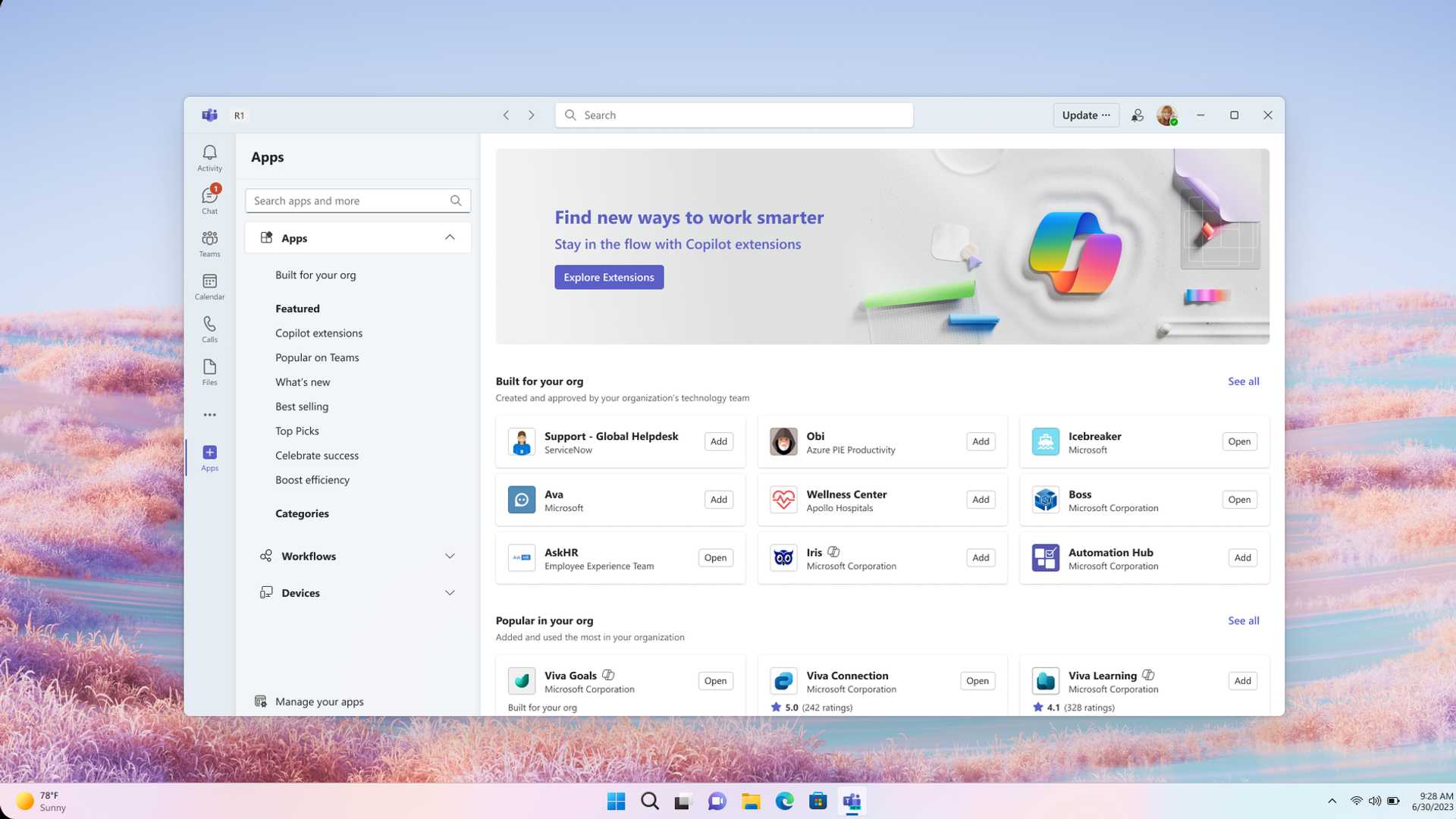
Open your Microsoft 365 apps: In Teams, Outlook, and the Microsoft 365 app you can access the app store from the Apps icon on the left navigation rail.
Search for Apps: Use the top banner or search bar to find specific apps or browse categories and top picks to discover new tools. Click on an app to view its description, ratings, and user reviews.
 Microsoft Copilot Pricing: Plans, Hidden Costs & Management
Install and pin: If adding apps has been enabled, users can simply click “Add” to install the app. To pin the app to the left navigation rail in Teams, Outlook, and the Microsoft 365 App for easy persistent access, users can right click on the app icon and select “Pin.” Users can then drag and drop the pinned apps to reorder them according to preference.
Managing Apps for your Organization
The Microsoft 365 admin center and Teams admin center offers a broad set of capabilities and controls to ensure that Microsoft and third-party apps are used according to their organization’s needs and preferences. Key examples of these controls include:
Additional interoperability options with Microsoft 365
Microsoft provides additional ways to connect with partners, ISV’s and third-party data sources with Microsoft 365. The Microsoft commercial marketplace supports your organization's needs to purchase innovative vendor solutions, while satisfying your organization's business requirements. Microsoft AppSource already hosts thousands of apps, with millions of end users using these tools to enhance their workflows and productivity every day. AppSource is best for independent purchasing or for Microsoft 365 or Power BI applications, providing efficient distribution and reach for developers and where the product catalog can be accessed at https://appsource.microsoft.com/ or through the in-product experience in Microsoft 365, Dynamics 365, and Microsoft Power Platform.








