A Comprehensive Guide to the ChatGPT API - DocsBot AI
Are you ready to dive into the world of AI and revolutionize your applications with the magic of natural language processing? The ChatGPT API from OpenAI serves as your gateway to crafting intelligent, responsive, and highly interactive applications.
Whether you are an experienced developer or just embarking on your coding journey, this guide is here to provide you with a comprehensive understanding of the ChatGPT API—from the basics to advanced use cases and the development of real-world applications.
In this article, we will walk you through the process of acquiring your API key, setting up your development environment, and harnessing the API's full potential for tasks such as creating chatbots, generating content, and more.
Understanding the ChatGPT API

The ChatGPT API, offered by OpenAI, enables you to integrate advanced language models such as GPT-4o, o1/o3, and GPT-4.5 into your projects. These models possess the ability to comprehend, reason, and produce text that closely mimics human language, making them highly suitable for a wide array of tasks.
Here are some key capabilities of the ChatGPT API:
- Add AI-powered features to your applications, enhancing their intelligence and engagement levels.
- Highly customizable settings allow you to adjust parameters like model type, response creativity, and output length to align with your specific needs.
Before commencing your journey with the ChatGPT API, you need to obtain an API key from OpenAI. This key serves to authenticate your requests and associate them with your account for billing and access purposes.
To acquire your API key, visit the OpenAI platform and either create a new account or log in if you already have one. Once in the dashboard, navigate to the API Keys tab, where you can manage and generate your keys. Click on Create new secret key to obtain your API key. Remember to copy it immediately and store it securely, as OpenAI will not display it again.
Maintaining the security of your API key is crucial to prevent unauthorized access or unexpected charges. In case of key loss, you always have the option to generate a new one from the dashboard.
Setting Up Your Development Environment
The ChatGPT API is compatible with various programming languages, with Python standing out for its simplicity and extensive library support. Here is how you can configure your development environment:
- Ensure that you have Python 3.7 or above installed. You can obtain it from the official Python website.
- Set up a virtual environment to keep your project dependencies isolated.
- Install necessary libraries like
openaiandpython-dotenvto interact with the API securely. - Create a
.envfile in your project directory and add your API key. - Test your setup with a simple script to confirm readiness.
With your development environment in place, it is time to witness the ChatGPT API in action.
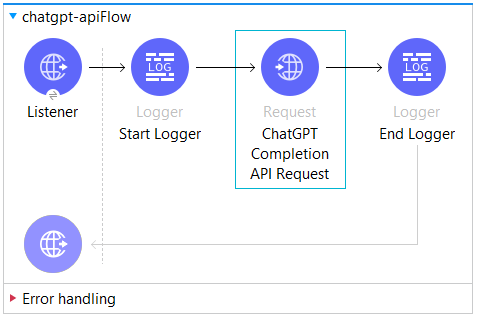
The following section presents three user-friendly examples to showcase the API's versatility in creating content, analyzing images, and generating structured data. Whether you are coding in Python, JavaScript, or utilizing simple HTTP requests, these code snippets will equip you to hit the ground running.
Exploring Practical Use Cases
1. Content Creation: Leverage the ChatGPT API to craft engaging text such as stories, poems, or witty responses effortlessly.
2. Image Analysis: Experiment with models like gpt-4o to obtain descriptive outputs based on image URLs, a game-changer for visual content processing applications.
3. Structured Data Generation: Utilize the API to extract organized data in JSON format, ideal for applications reliant on structured information.
These examples demonstrate the flexibility of the ChatGPT API in generating creative text, harnessing multimodal capabilities for image interpretation, and delivering structured data tailored to your application's needs.
Ready to delve deeper? The subsequent section explores advanced optimization techniques to elevate your API usage and enhance performance.
Advanced Optimization Tips
Once you have mastered the basics, these advanced strategies will empower you to maximize the potential of the ChatGPT API, resulting in improved performance, cost-efficiency, and enhanced user interactions.
Play around with these optimization techniques to align the API with your application's requirements:
- Refine prompts for better results.
- Maintain clear prompts for precise responses.
- Implement rate limit handling for seamless application operation.
- Explore cost-saving measures and monitor expenses via the OpenAI pricing page.
- Define a schema for structured outputs to receive neatly formatted results.
- Implement fail-safes to ensure uninterrupted user experiences.
- Customize models with specific data to fine-tune responses for niche requirements.
- Emphasize API key security to prevent unauthorized access.
The ChatGPT API unlocks a myriad of possibilities for developing AI-driven applications.
Pairing the ChatGPT API with Retrieval-Augmented Generation (RAG) can enhance precision and refine search capabilities, extending access to a wider user base.
Commence with small-scale projects and scale your applications progressively as you explore the diverse functionalities of the ChatGPT API.
Building your own chatbots from scratch may not be suitable for everyone.








