Gemini in Google Drive Becomes More Useful with New Video Update
After announcing several new features for Gemini at I/O 2025 last week, Google is now announcing an additional update. Google has introduced new Drive features that help Workspace users understand their saved videos more easily, without having to watch them.
The company is expanding its Gemini AI, which already summarizes documents and PDFs, to now include video files. This means users can quickly get an overview of a video’s content without watching it to the end.
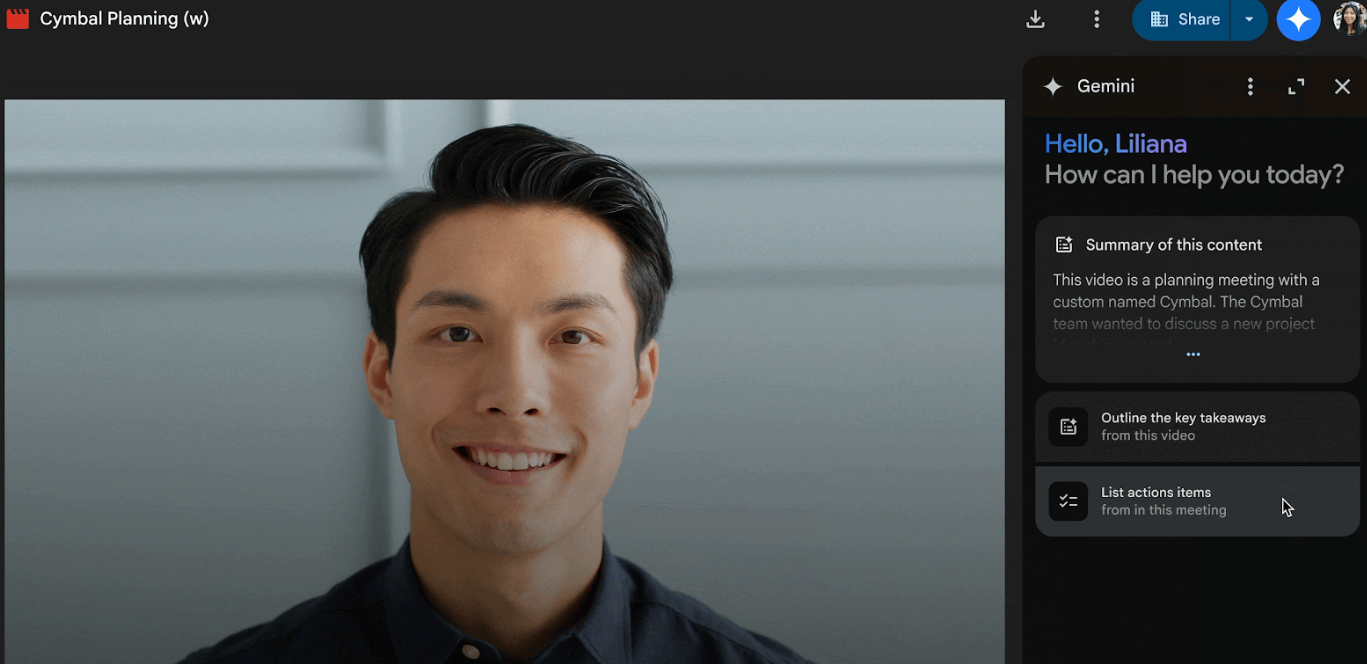
The Gemini feature in Drive works like a chatbot, offering short summaries or answer specific questions about the video. For instance, it can list key action points from meeting recordings or highlight important updates in announcement videos. This new tool aims to save users time by reducing the need to watch and take notes manually. Google explained that “Videos contain a wealth of information, however going back to watch them can be time-consuming. With this update, users can leverage Gemini to get what they need from their videos much faster.”
Accessing Gemini Feature in Google Drive
The feature works only when captions are enabled for the video and can be accessed either through Google Drive’s overlay previewer or by opening the video in a new browser tab. Once the video player is open, users can tap the Gemini icon in the top-right corner to open a side panel powered by AI. This panel offers a “Summary of this content” along with suggested prompts like “Outline the key takeaways” and “List action items”, useful features for teams that regularly record meetings. Users can also type in specific questions, like “List action items from this meeting recording”, or “What are the highlights from this announcement video?" to extract key information from the footage.
Gemini in Google Drive is currently available in English for Google Workspace and Google One AI Premium subscribers. The workspace customers that will have access to it will be the following: Business Standard and Plus, Enterprise Standard and Plus and customers with Gemini Education or Gemini Premium add-on. While the feature is now launched, it may take some time before it becomes fully available to all users.
Enhanced Video Engagement with Workspace Update
In addition to the new AI tools, Google is rolling another Workspace update focused on video engagement. The Drive video player will now display how many times a video has been opened, with this data available in the Analytics section of the Details panel. This gives users a basic sense of how their videos are performing and how often they’re being viewed.