Google Drive Summarization with Gemini AI
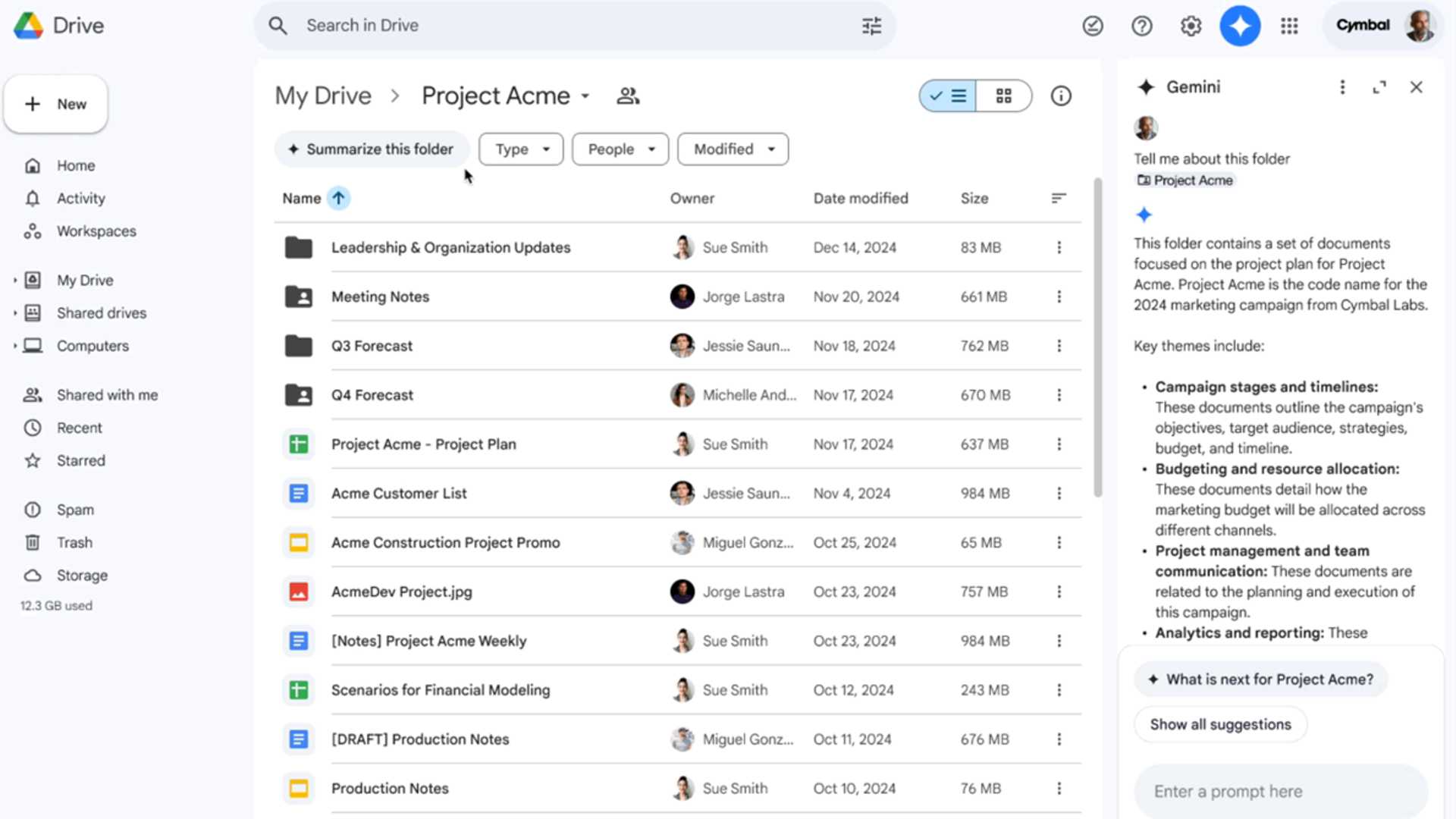
Google has recently introduced a new feature on its Gemini AI integration that allows users to request a summary of an entire Google Drive folder. This functionality can be very useful for quickly locating specific files within a folder or gaining insights into the overall theme of the content it contains.
How to Get a Summary
To request a summary, simply navigate to your Google Drive folder and click on the new “Summarize this folder” button. Alternatively, you can also do this from the document list outside the folder by right-clicking on the folder and selecting the “Summarize this folder” option from the context menu.
Using the Feature
Clicking the button will initiate a conversation with Gemini, and the folder summary will appear in a sidebar. You can then ask further questions like “Summarize files in @-folder” or “What is the theme of the content in @-folder.” You also have the option to open the Ask Gemini panel and drag and drop a folder into it to request a summary.
Supported File Types
The current feature is capable of summarizing and responding to questions for various file types including text documents, PDFs, spreadsheets, presentations, and even photos.
Gemini Data Usage Policy
Google's Gemini data usage policy specifies that your Gemini apps conversations, location, related product usage data, and feedback will be used to develop future AI products. Although your chats are disconnected from your Google account before being viewed, human reviewers do have access to Gemini conversations. Google advises against sharing any confidential information or sensitive data with Gemini. It is possible to delete files from the chat afterwards, and Google states that its AI tools are not currently trained on uploaded files.

Availability
The "Summarize this folder" command in Google Drive is currently accessible to paying users of Gemini AI, including Google One AI Premium subscribers and various Gemini Business, Enterprise, Education, and Education Premium users. The feature began rolling out on December 11 and may take up to 15 days to be available to all eligible accounts.
Background on Gemini AI
Gemini AI was first introduced in Google Drive as a sidebar assistant earlier this year. While it initially could summarize individual documents, the ability to summarize entire folders is a recent addition. The Gemini sidebar assistant is also compatible with other Google products such as Docs, Slides, Sheets, and Gmail.








