How to Turn Off Meta AI: The Easiest Options - AI Today
If you're looking to learn how to turn off Meta AI, you're not alone. While AI assistants can be helpful in many ways, they can also be intrusive and may raise privacy concerns. Meta AI, the artificial intelligence assistant created by Meta (the owner of Facebook, Instagram, and WhatsApp), is integrated into most of Meta's apps and tools.
Meta AI, powered by the Llama 3 large language model, is designed to enhance user experiences by generating images from prompts, answering questions, and sharing information from the web. However, there have been reports of strange interactions between Meta AI and real people, along with ethical, security, and privacy issues to consider.
If you're worried about Meta AI collecting your data, you're not alone. Meta isn't very transparent about the data it uses to train its models, but public information collected includes posts, comments, and images shared by users over the age of 18.

How to Stop Meta AI from Collecting Your Data
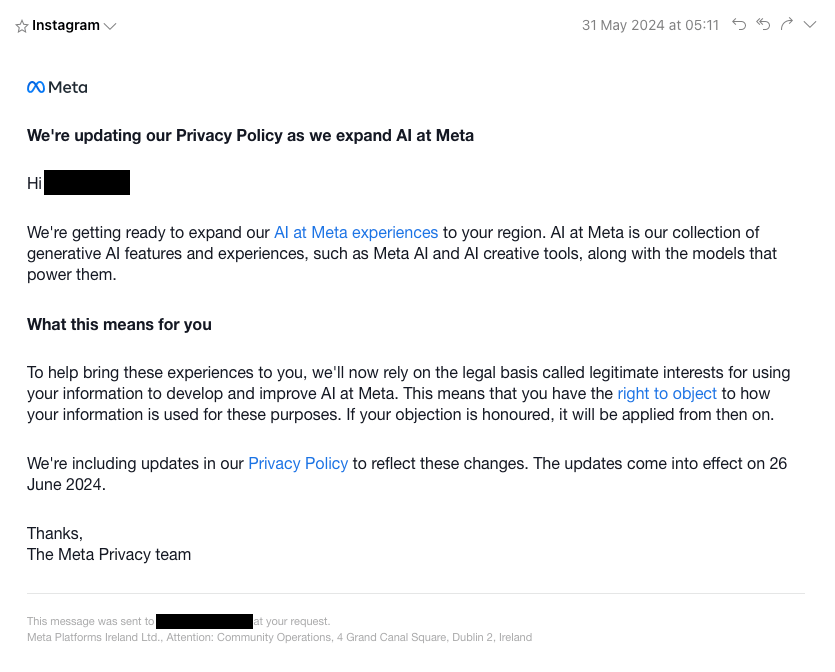
Unfortunately, there isn't a simple way to opt out of Meta collecting your data through its AI systems and tools directly. However, if you're located in the EU, you have some protection under GDPR, giving you the right to object to Meta using your data.

To object to Meta using your data, visit the "Privacy Center" page from your Meta account on Facebook, Instagram, or Messenger. You can fill out a form explaining how Meta's data collection process affects you, and Meta will decide whether to honor your objection.
Reducing Meta AI's Presence
While there isn't a one-click solution to turn off Meta AI completely, you can mute the assistant to reduce its presence. You can also disable AI summaries on Facebook to improve your experience on Meta apps.
It's important to be mindful of the information you share on social media and when interacting with Meta AI. Using strong passwords, two-factor authentication, and a VPN can help enhance your privacy and security.
Staying informed about Meta's services and AI features can also help you protect your data. As regulations around AI evolve, there may be more options for users to control how their data is collected and used.
While avoiding Meta AI entirely may be challenging, staying informed and taking steps to protect your privacy can help you navigate the AI landscape more securely.
Stay up to date with the latest developments in AI governance, generative AI, and Meta AI by checking out the latest news stories here on AI Today.








