
What Google Messages features are rolling out [U]
Google Messages is known for A/B testing various features before rolling them out to users. However, the process of launching these capabilities in a stable version can sometimes take a significant amount of time after the initial announcement.
Recent Updates
One of the recent updates on Google Messages involved the redesign of the compose box. Users who were not fond of the redesigned compose box introduced in early 2024 will be pleased to know that Google has now consolidated everything back into one line for a more compact design.

Another notable update is the revamp of the voice memo recording feature. Instead of the previous long-press action to record a voice memo, users can now simply tap to access a dedicated panel. Additionally, a new noise cancellation option has been introduced, which is enabled by default.
Customization Options
Google Messages now offers customization options for RCS conversations, allowing users to change bubble colors. With nine bubble and background color options available, users can personalize their messaging experience according to their preferences.
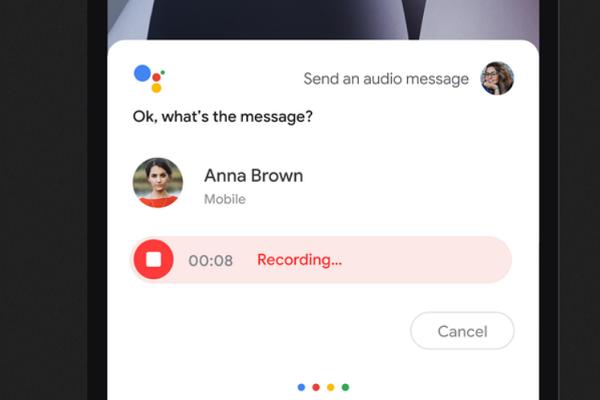
Google Assistant has recently integrated a feature that allows users to send audio messages through Google Assistant. As part of this feature, users can now dictate a message, which Google Assistant will convert into a voice message before sending it to the recipient.
Introducing Gemini Chatbot
One of the latest additions to Google Messages is the Gemini chatbot, designed for 1:1 conversations. To access Gemini, users need to have RCS enabled and be signed in to Messages with a Google Account. Gemini offers concise responses and the ability to upload images for analysis.
Enhanced Multimedia Features
Users can now record a 3-second circular GIF by long-pressing the gallery icon or through the 'plus' menu. Additionally, after recording an audio memo, users can customize the player interface that the recipient will see, with options like themed emojis and effects.
Editing Messages
Google Messages now allows users to edit an RCS message within 15 minutes of sending it. By long-pressing the message and tapping the pencil icon in the toolbar, users can make edits, with an "Edited" label displayed afterwards. This feature requires all participants in the conversation to have it enabled.
Attachment and Sharing Improvements
After taking a picture using the inline camera, users are now directed to a new attachment screen, providing a fullscreen preview and options to add more attachments or send the image directly. The app also features an updated UI for selecting recipients when sharing content.
WhatsApp is rolling out a feature that allows users to set view once mode for voice notes. This feature will enable users to send voice notes that can only be viewed once by the recipient.

These are just some of the features that Google has announced or that have been spotted by beta users in Google Messages. As the app continues to evolve, users can expect more enhancements and capabilities to improve their messaging experience.








